When Maximo is slow the evidence is spread across the database, the logs and the JVM, and nothing joins it. MXRay runs
inside the Maximo JVM and does the joining: a work order save by one user, six hundred and fifty SQL statements with an
N+1 on ASSET, forty percent of the time inside one automation script, a connection leaked in a custom class at a named
line. Every screen it draws is also an API, so an AI assistant can query it and reach the same conclusion. It changes
nothing in Maximo.
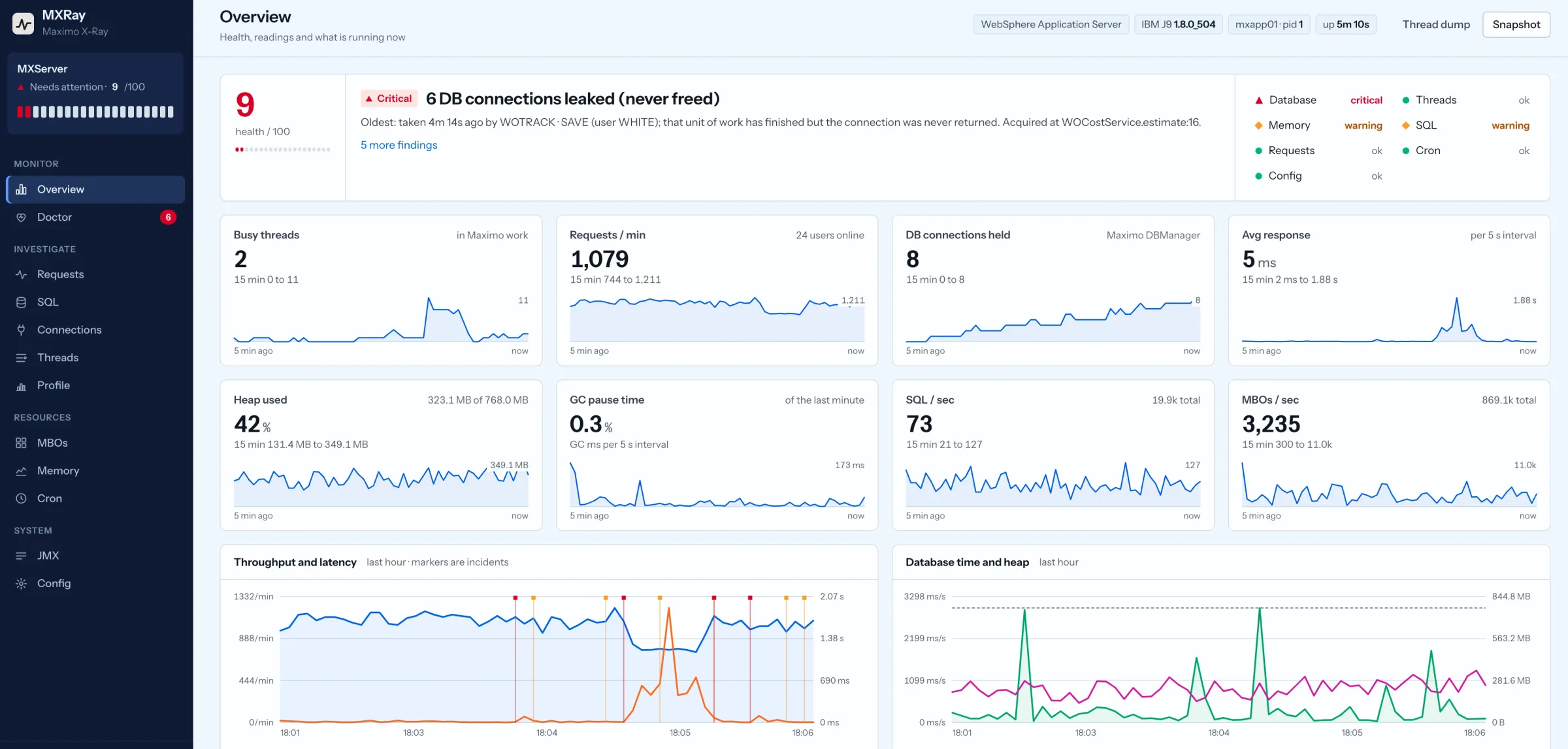
The overview during a connection leak. Capture from MXRay running against its Maximo simulator, not a customer system. Open full size.
What it shows
One screen per question you ask during an incident.
Every number is attributed to a Maximo action, a user and, where there is one, the custom class or automation script responsible. Each screen below links to the part of the field guide that explains what it is showing.
Requests & users
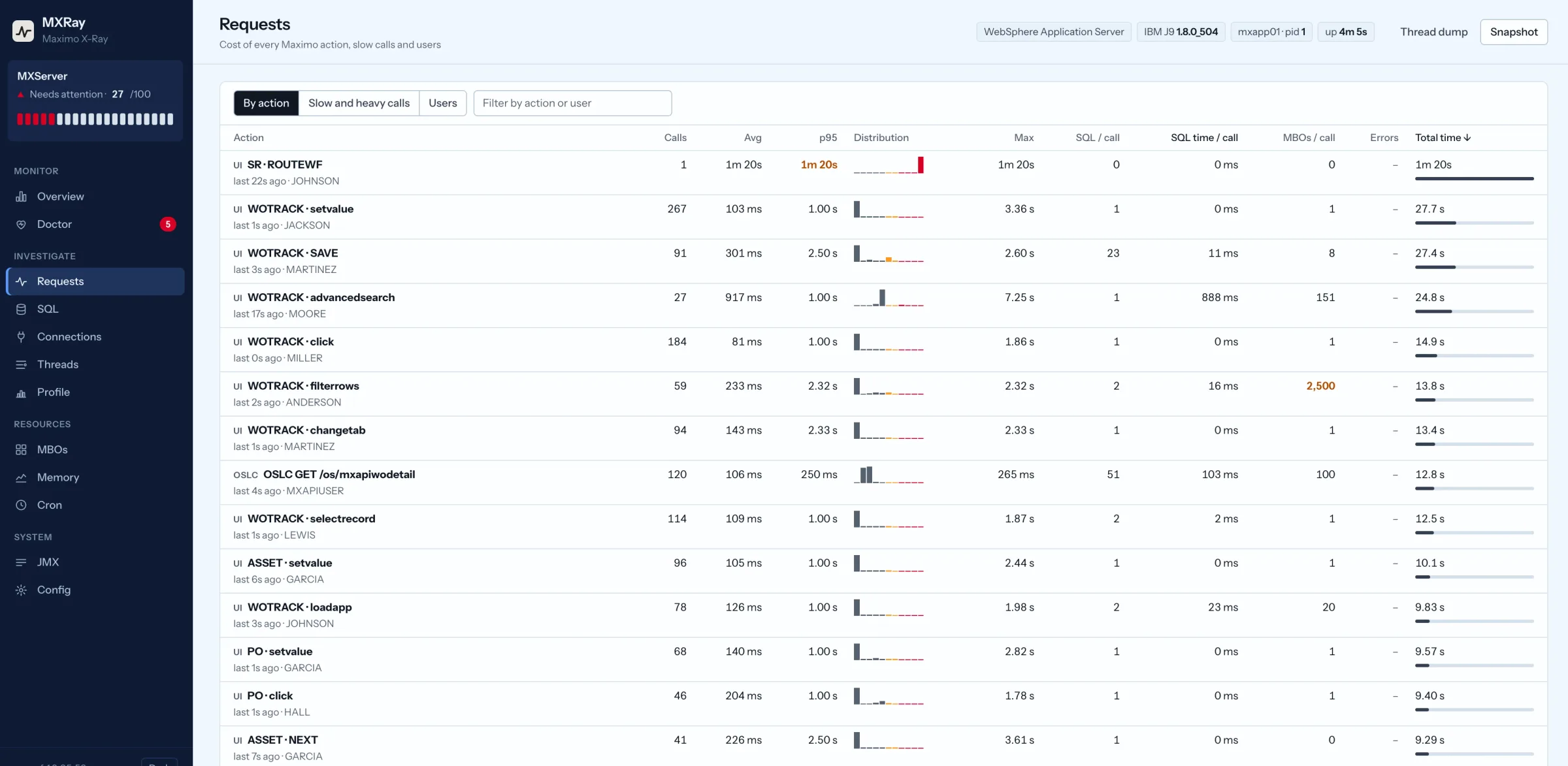
Each Maximo action, such as WOTRACK save or an OSLC GET, with p50 and p95, SQL per call, MBOs per call, errors and the last user. Drill into a slow call for the database versus Java split.
Requests & users. Capture from MXRay against its Maximo simulator. Open full size.
SQL
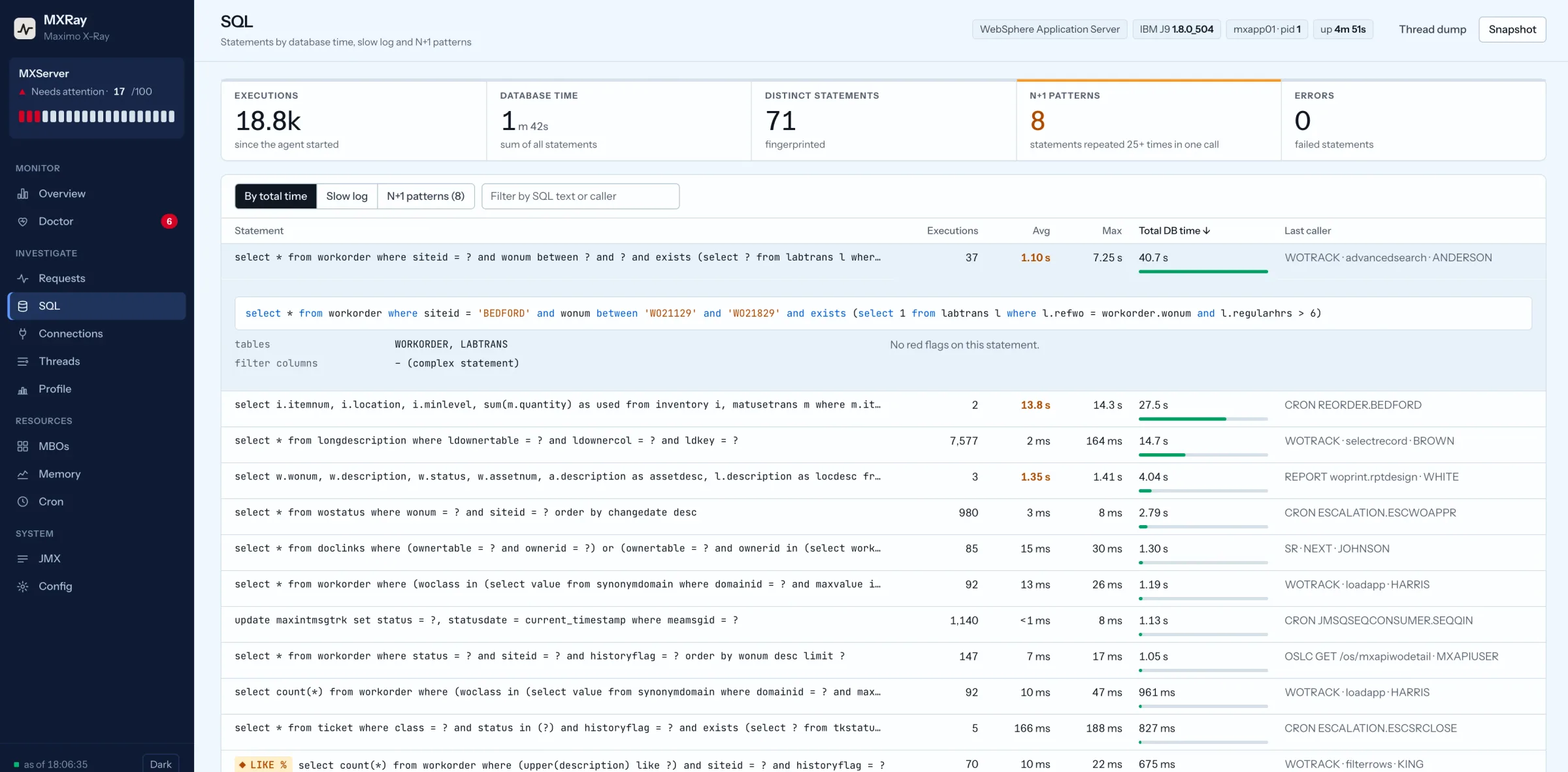
Every JDBC statement fingerprinted and attributed to the action and user that ran it. Top statements by database time, a slow log, N+1 detection, leading-wildcard and unfiltered-select flags.
SQL. Capture from MXRay against its Maximo simulator. Open full size.
DB connections
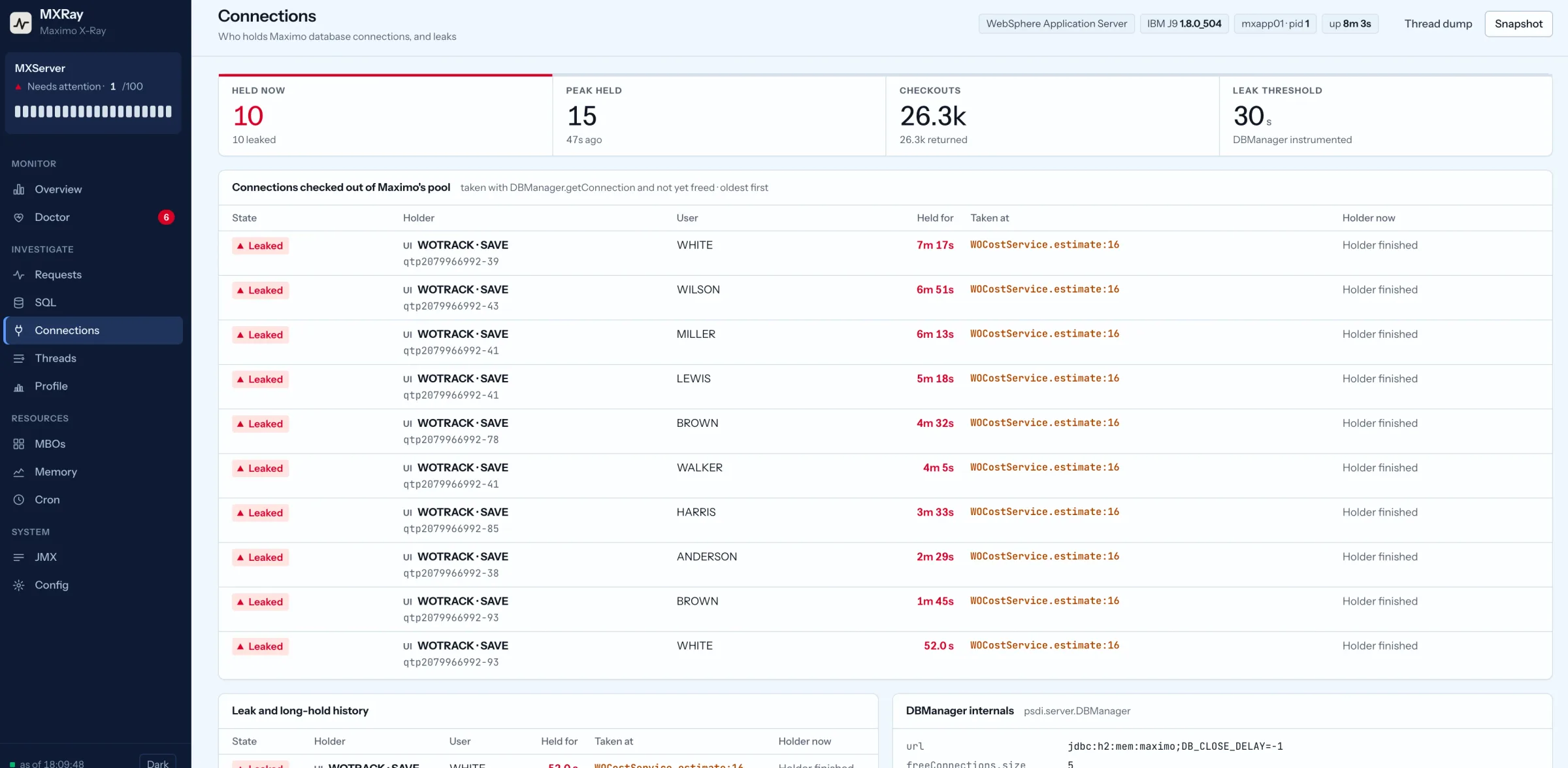
Every DBManager lease with holder, user, age and the stack that took it. Leaked connections, where the unit of work finished and never freed, are separated from long-held ones.
DB connections. Capture from MXRay against its Maximo simulator. Open full size.
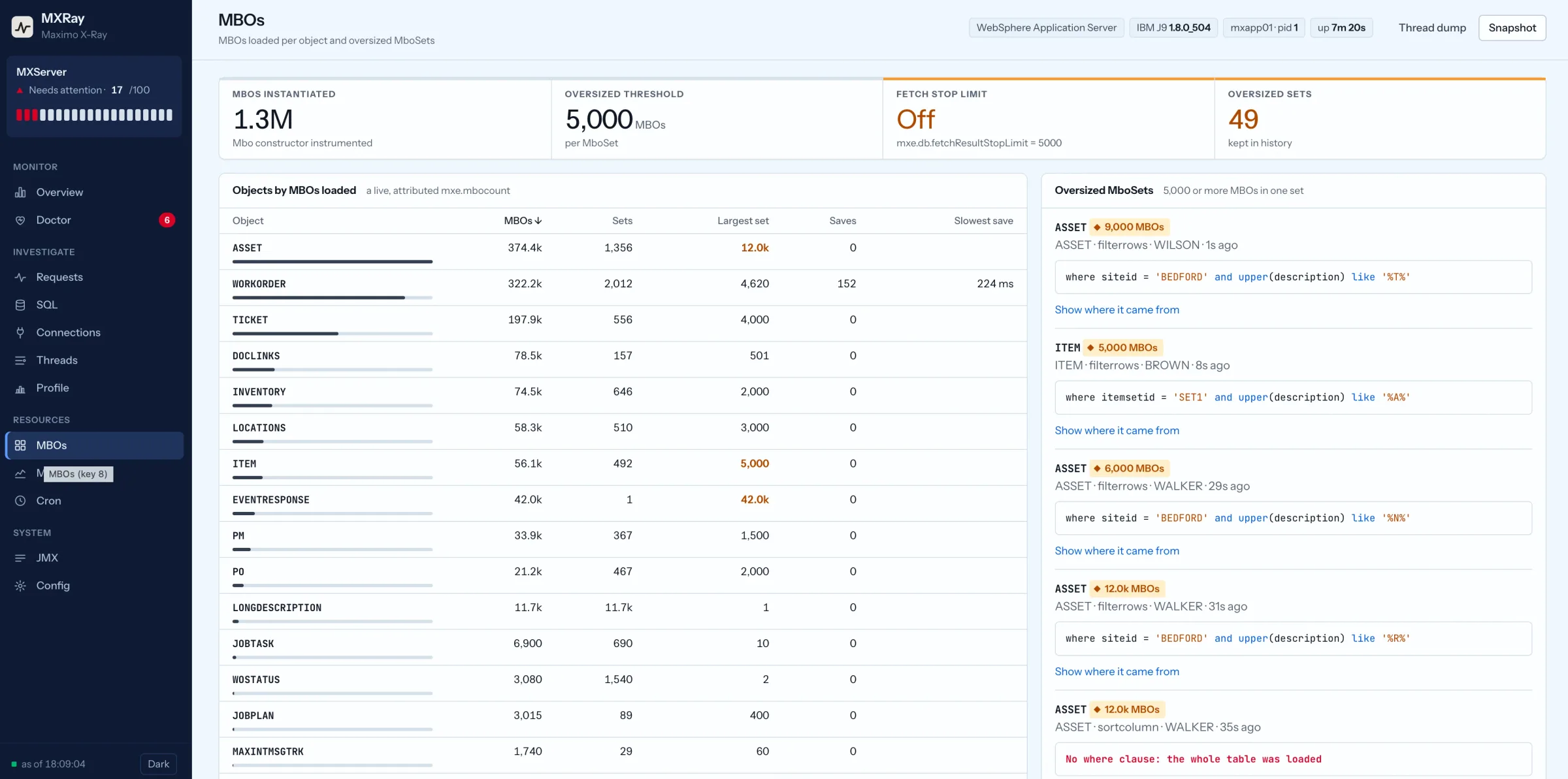
MBOs
A live, attributed mxe.mbocount: MBOs per object, largest set, save timings, and oversized MboSets with the where clause, user and stack. The fetch stop limit state sits beside them.
MBOs. Capture from MXRay against its Maximo simulator. Open full size.
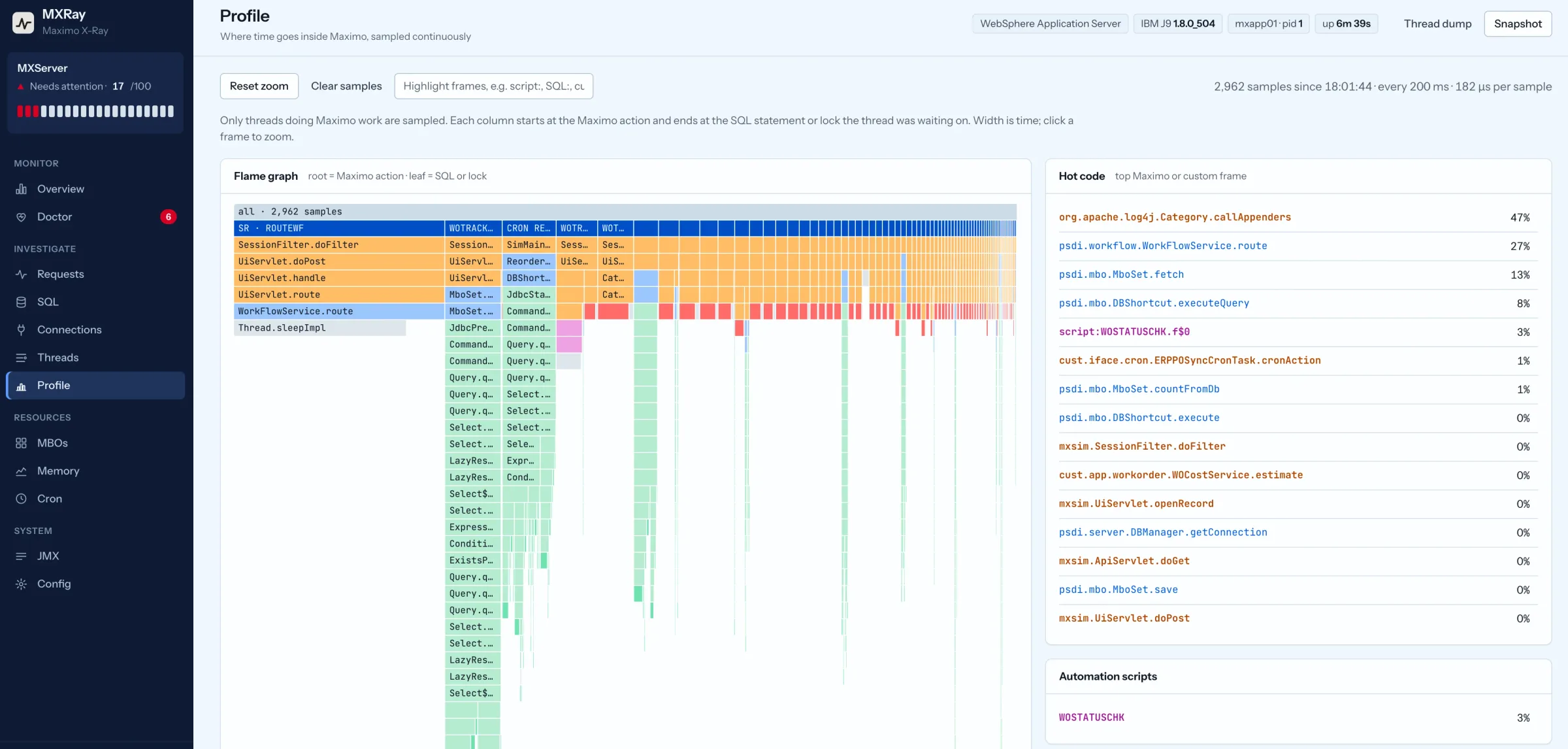
Flame graph
An always-on sampling profiler for threads doing Maximo work, rooted at the action, with custom code, Maximo frames and automation scripts coloured apart. A logging convoy shows up as the appender at the top of the hot list.
Flame graph. Capture from MXRay against its Maximo simulator. Open full size.
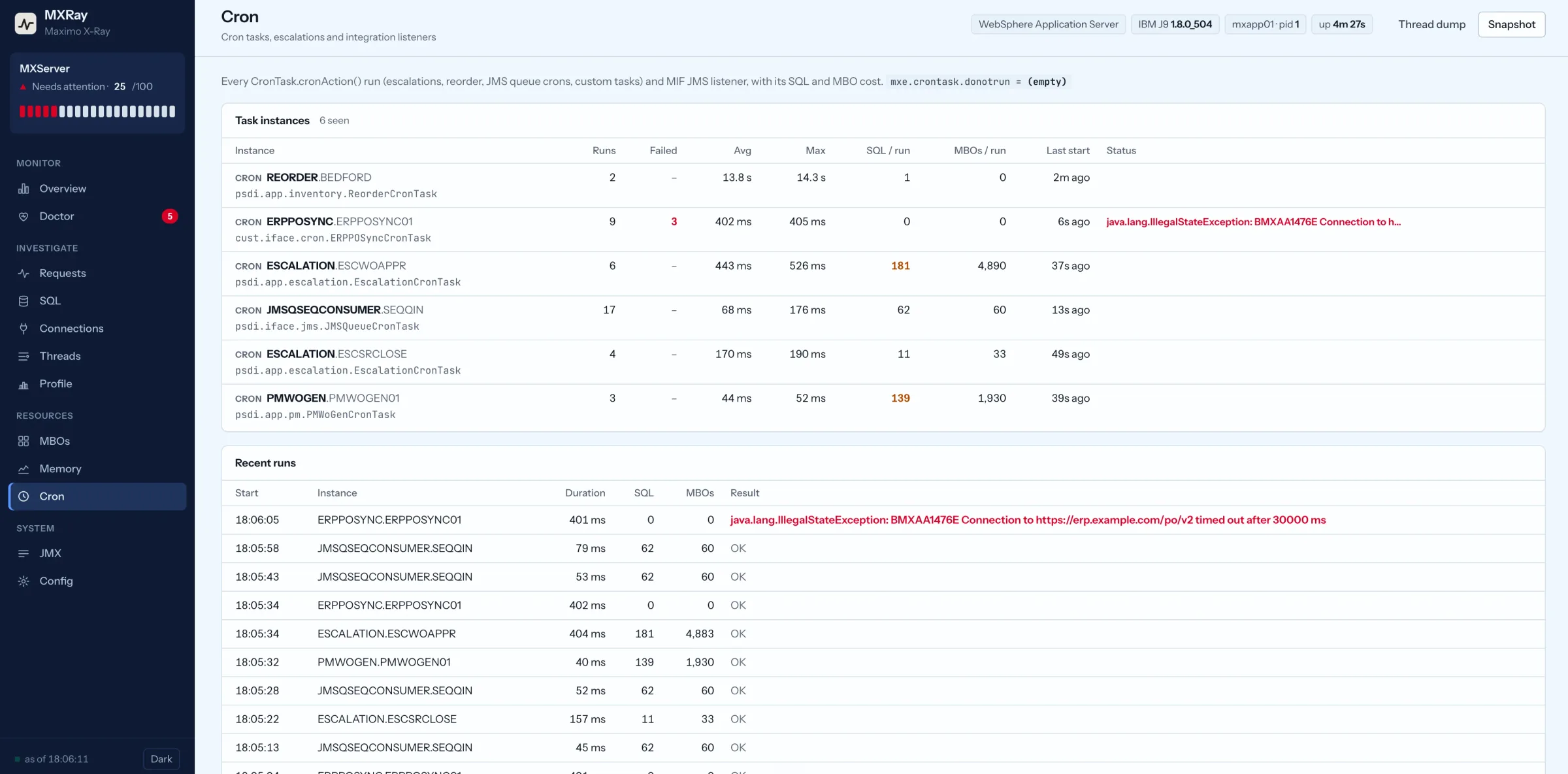
Cron & integration
Every cron task, escalation and JMS listener run: failures with the exception, overlaps, SQL and MBOs per run, and whether the instance is running where users are working.
Cron & integration. Capture from MXRay against its Maximo simulator. Open full size.
Threads X-Ray
A thread dump translated into Maximo work: UI, cron, escalation, workflow, integration, report, script, waiting on database. Lock convoys and deadlocks named. Downloadable, annotated, for a ticket.
Memory & GC
GC pauses and overhead for IBM J9, OpenJ9 and HotSpot, and a projection of when the heap runs out if the trend continues.
JMX / Config
MBean browser, hook status, Maximo system properties with secrets masked, and JVM arguments.
API for agents
Every screen is a JSON endpoint: /api/doctor, /api/db, /api/threads, /api/sql and the rest, plus /api/brief and /llms.txt. An AI assistant can query them directly and write the report.
How it runs
One jar, one JVM argument, nothing inside the EAR.
Start with the JVM, or attach live
One line in the WebSphere JVM configuration and a restart, or attach to a running JVM with the WebSphere JDK as the
same OS user. Already-loaded Maximo classes are instrumented in place. Removing it is that one line and a restart.
Read-only by construction
Hooks sit on servlet entry, JDBC prepare and execute, DBManager get and free, the Mbo constructor, MboSet save, cron
runs and integration listeners. Each swallows its own errors. A missing Maximo method leaves that hook inactive
rather than failing. A kill switch drops to sampling-only mode with no bytecode changes.
Local dashboard, no network calls
The embedded dashboard binds to 127.0.0.1 and works on an air-gapped server over an SSH tunnel. There are no
external calls and no dependencies loaded into Maximo. Password-like properties and JDBC passwords are masked.
Built for agents as well as people
Every endpoint the dashboard uses is a plain JSON API, with a compact /api/brief and an
/llms.txt that explains the method. An AI assistant can pull the findings, the leaked connections and
the slow actions in a few GET calls, cross-reference them and write the report with fix steps. No screen-scraping,
no copying numbers between tools.
Evidence that survives a restart
A critical finding writes an incident snapshot to disk, at most once every five minutes. Any moment can be
exported as a JSON snapshot or an annotated thread dump for a ticket. Prometheus metrics are exposed for Grafana.
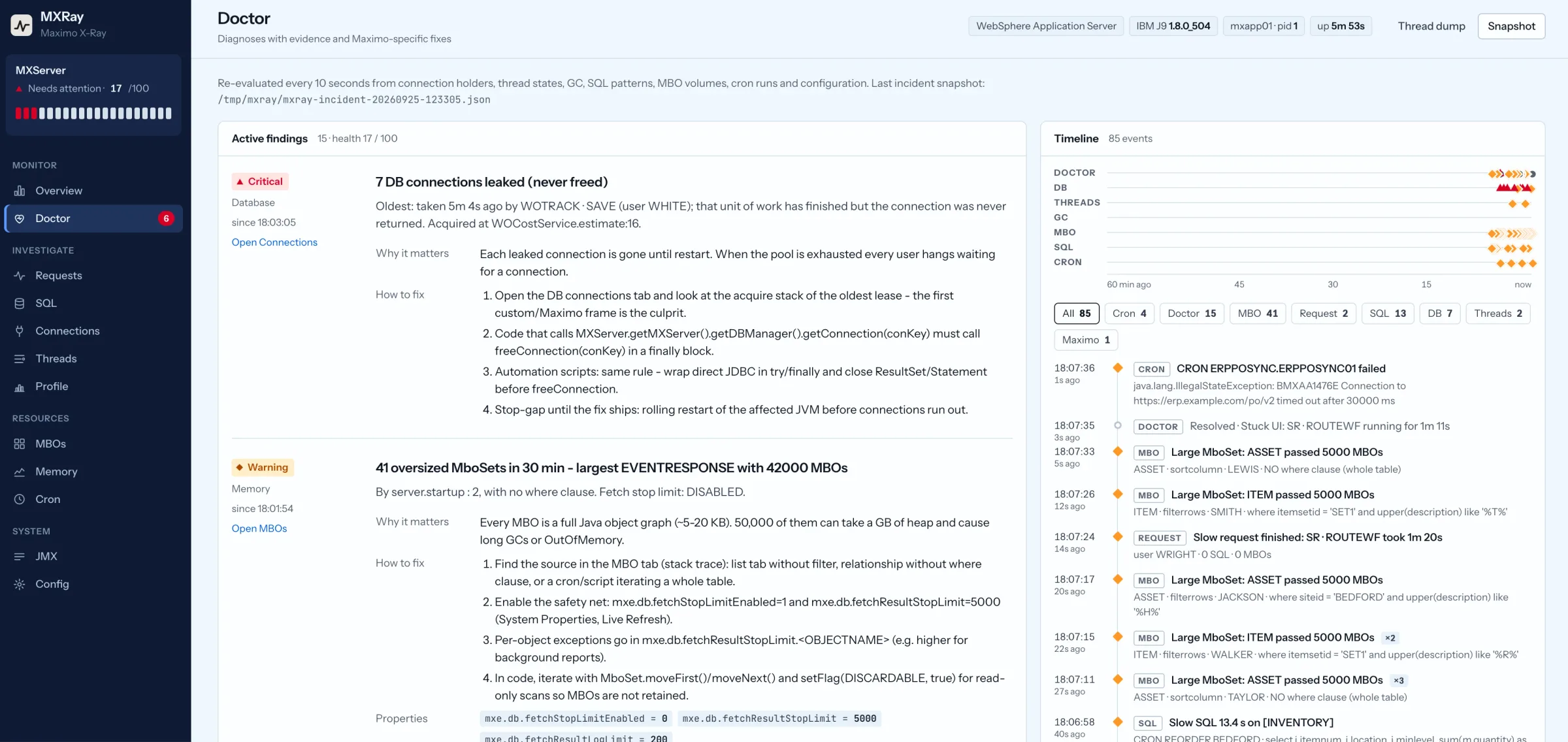
The Doctor tab: findings with evidence, impact, Maximo fix steps and the property values behind them. MXRay against the simulator. Open full size.
Early access
Built by a Maximo architect, opening to the first Maximo environments now.
What you get
The agent, a deployment guide for WebSphere console, wsadmin and live attach, an operations guide with incident
playbooks, and direct support from the person who built it. No charge during early access.
What we ask
Start on a development or test JVM. Open the Config tab and confirm every hook shows active, click through a few
applications, and send back a short test report. Findings from your estate shape what ships next.
Who it fits
Maximo on WebSphere traditional with Java 8 or later. Liberty and Manage on request. Estates with custom
Java, automation scripts, heavy escalations or integration traffic get the most out of it.
Where it came from
The diagnostic rules are the ones described in the field guide to why Maximo is slow,
written down so the triage happens continuously instead of at 3 a.m. by hand.
Questions Maximo administrators ask first.
Frequently asked questions
Does MXRay change anything in Maximo?
No. It is read-only. Nothing is deployed into maximo.ear, nothing is written to the Maximo database, and no Maximo setting is changed. It observes through bytecode instrumentation inside the JVM and reflection on MXServer.
What does it cost the JVM?
A handful of cheap hooks: servlet entry, JDBC prepare and execute, DBManager get and free, the Mbo constructor, MboSet save, cron task runs and integration listeners. The profiler samples only threads doing Maximo work and can be turned off. Every hook swallows its own errors, so a monitoring fault cannot fail a Maximo transaction.
Which versions does it support?
Maximo on WebSphere Application Server traditional with Java 8 or later, including IBM J9. Recent versions follow the same JVM model. Liberty and Maximo Application Suite Manage take the same JVM option and are covered on request during early access.
Does it need a restart?
Either way works. Add one line to the WebSphere JVM configuration and restart, or attach it live to a running JVM with the WebSphere JDK as the same OS user. Removing it is one JVM argument and a restart.
Is the dashboard exposed on the network?
By default it listens on 127.0.0.1 only and you reach it over an SSH tunnel. If you bind it wider, a token is required. Snapshots contain SQL text, user names and stacks, so treat them as sensitive.
What does early access involve?
You get the agent, the deployment guide, the operations guide and direct support from the person who built it. We ask that you start on a development or test JVM, confirm every hook shows active on the Config tab, and send back a short test report. There is no charge during early access.
Early access
Put MXRay on a test JVM this week.
Tell us the Maximo version, the application server and what has been slow. You will get the agent, the guides and a person to talk to.