engineering / Maintra journal
Why is Maximo slow? A field guide
Eight causes behind a slow Maximo JVM, where each shows up in the database, logs and thread dump, and how to read them together, by hand or with an agent.

Monday, 09:40. The service desk says Maximo is slow. CPU on the UI server is at thirty percent, and a planner at one site is watching a work order save take sixteen seconds.
The administrator opens SystemOut.log. The DBA opens the session list. The developer opens a thread dump. Each of them is looking at a real piece of the problem, in a different tool, in a different vocabulary, and none of the pieces says “WOTRACK save, user WHITE, custom class WOCostService, line 16”.
Somebody suggests a restart. The symptom clears, the evidence is gone, and it happens again next Monday.
This is what I check instead, in the order I check it. It applies to Maximo on WebSphere and, with the same JVM option, to Liberty and Manage.
Where slowness actually lives
“Slow” hides four different situations. Work out which one you have first, because the first place to look is different for each.
| What people report | First place to look | What it usually is |
|---|---|---|
| Everyone is slow, and getting slower | Connection pool and heap after full GC | Leaked connections or a heap that never comes back down |
| Everyone is slow at the same times of day | Cron Task Setup history and the thread dump | Escalations, reorder or a custom cron running in the UI JVM |
| One screen or one action is slow for everyone | SQL log filtered by that action | Relationship in a loop, wildcard search, unfiltered list |
| Nothing responds at all | Thread dump, then the database’s blocking sessions | Lock convoy, deadlock, or every thread waiting on one blocked session |
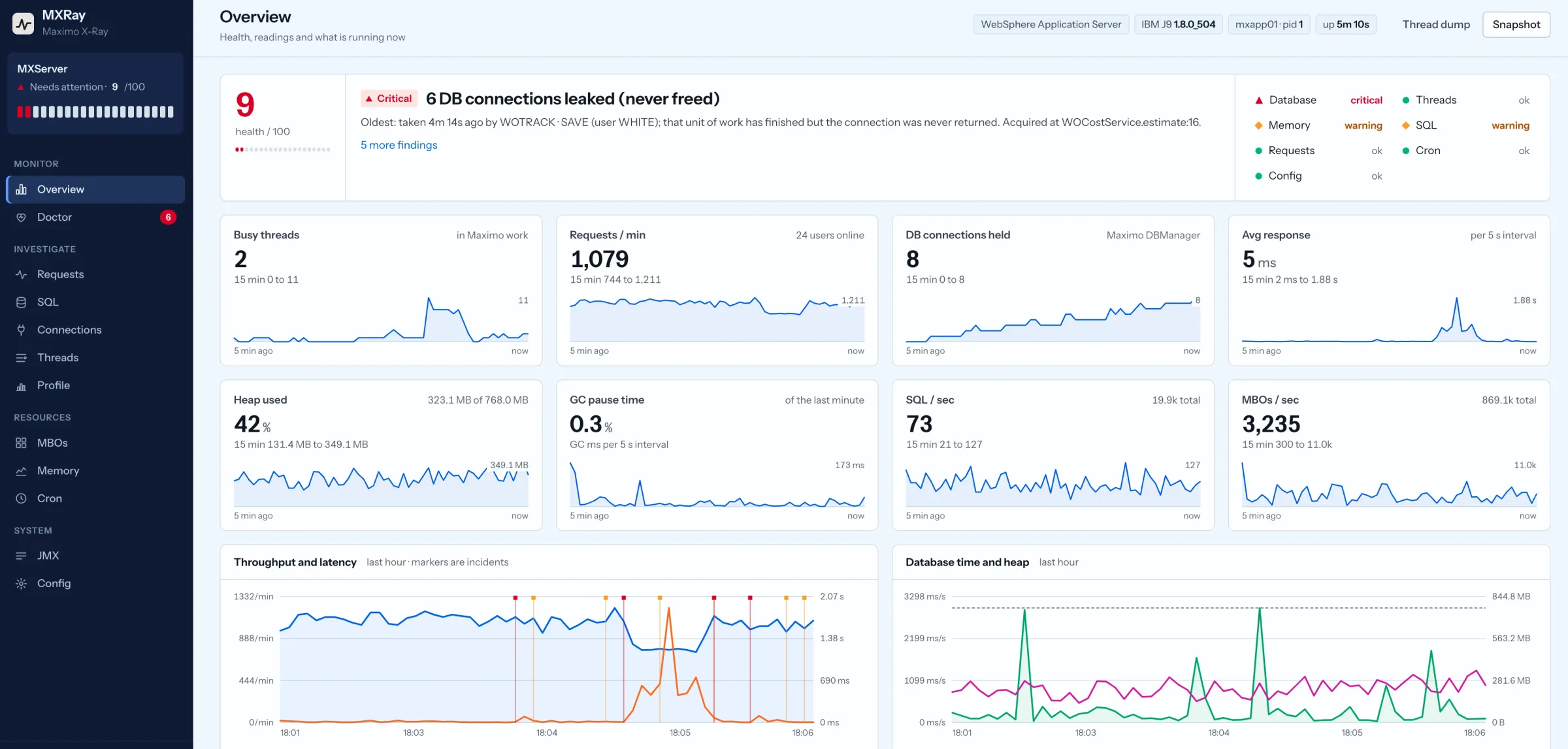
Connections that never come back
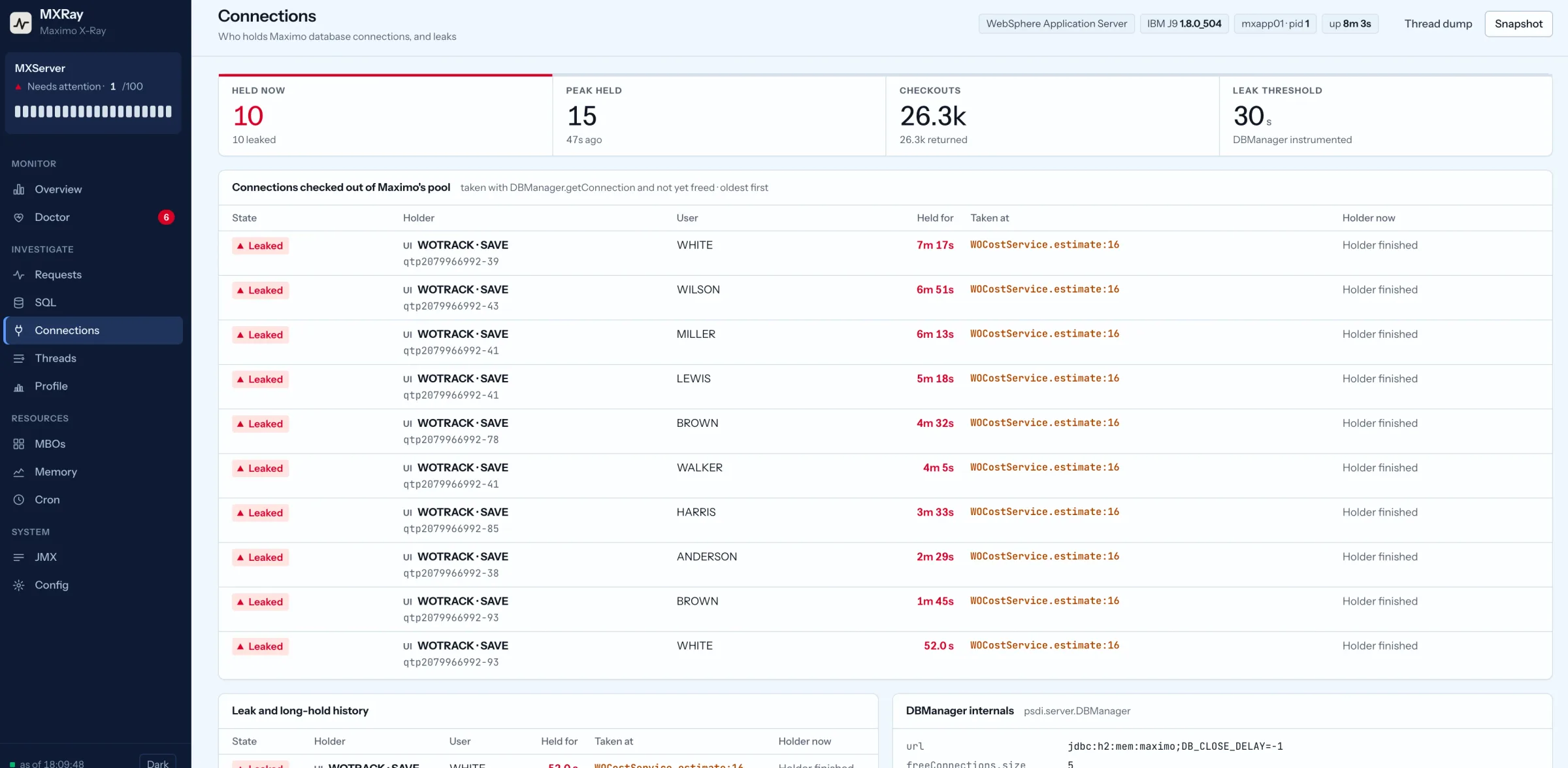
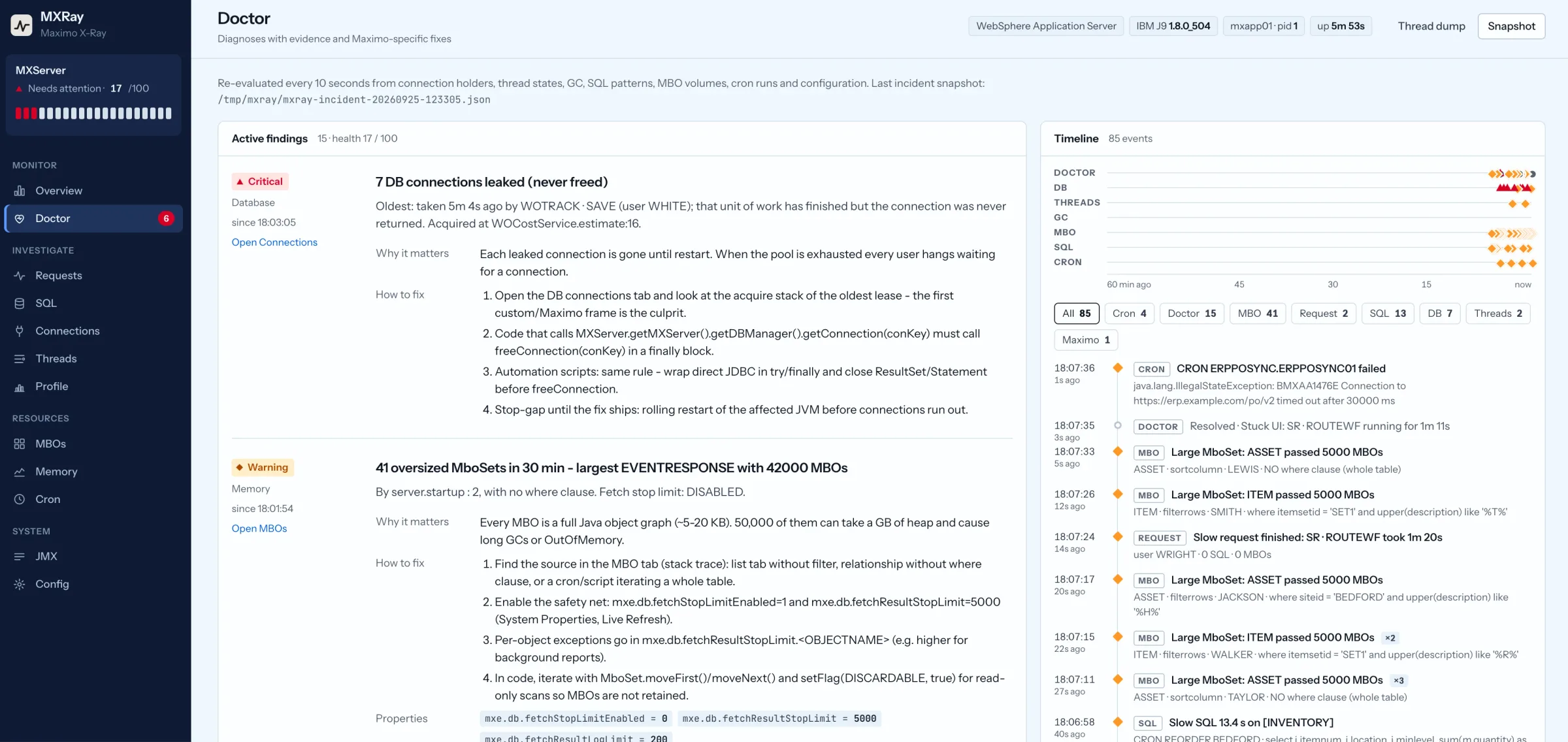
Maximo runs its own pool through psdi.server.DBManager. Code that calls getConnection(connectionKey) must call freeConnection(connectionKey) in a finally block. If an exception escapes between the two, that connection is gone until restart, and nothing logs it.
The fingerprint is gradual degradation, then a cliff. The database session count for that JVM host climbs and stays up, and the thread dump shows WebContainer threads waiting inside DBManager.getConnection. The culprits are custom field classes and automation scripts that open a connection for direct JDBC.
Search for getDBManager().getConnection and pair every one in finally. Until the fix ships, a rolling restart before the pool runs dry is the honest stop-gap.
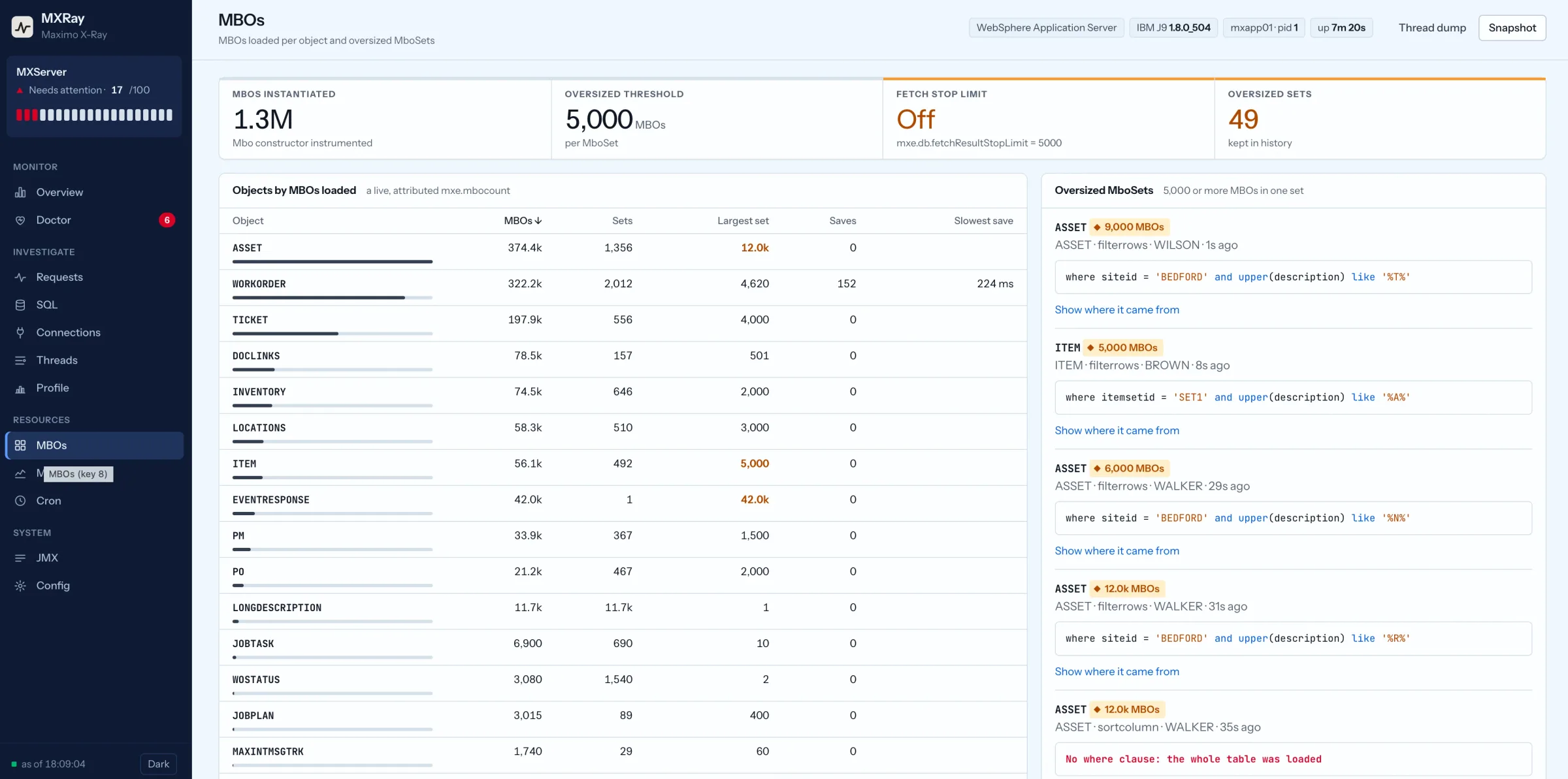
Memory: oversized MboSets and the GC settings
Every business object is a full Java object graph of five to twenty kilobytes. A list tab opened without a filter on a hundred thousand assets asks the JVM to build a hundred thousand of them, and fifty thousand MBOs in one set can take a gigabyte of heap and stall everyone through a long collection.
Maximo ships the safety net: mxe.db.fetchStopLimitEnabled=1 with mxe.db.fetchResultStopLimit=5000. It is enabled by default and switched off at a surprising number of sites after one complaint. Per-object exceptions go in mxe.db.fetchResultStopLimit.<OBJECTNAME>.
Give list tabs a default query, then turn the limit back on with Live Refresh. Code that iterates a large set read-only should call setFlag(MboConstants.DISCARDABLE, true) and work in batches.
On the JVM side, four settings cause most of the trouble on IBM J9: initial and maximum heap equal, -Xgcpolicy:gencon, a nursery of a quarter to a third of the heap, and -Xverbosegclog switched on. The GC log answers the question that matters: after a full collection, does the heap come back down to where it was yesterday? If the floor rises day after day, something is holding MBOs, usually a static field, a session attribute or a cache in custom code. Take a heap dump while the JVM is up, open it in Eclipse Memory Analyzer and sort by retained size.
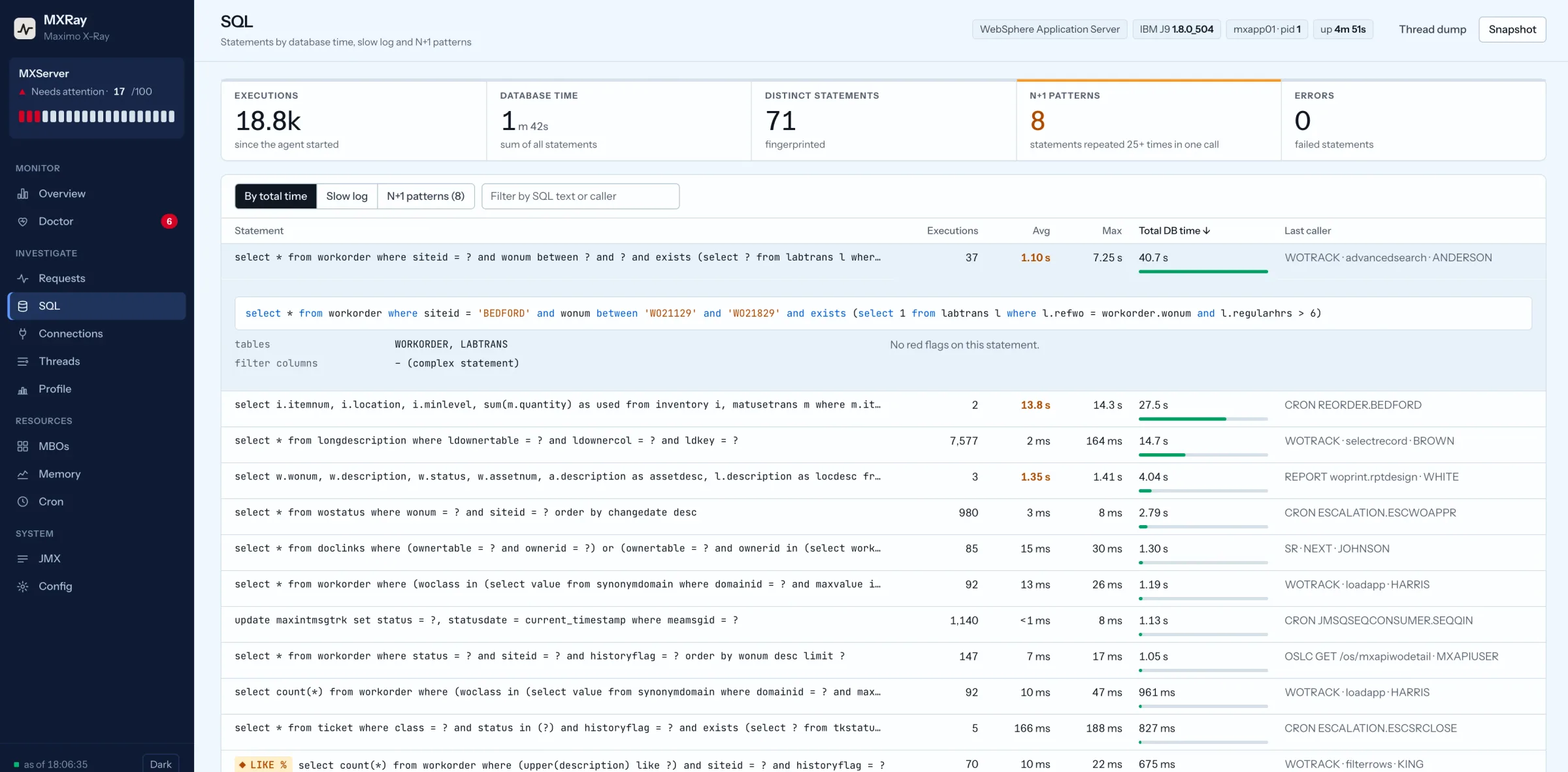
SQL that multiplies inside custom code
The most common reason one action is slow is the N+1 pattern: a save loops over a set and calls mbo.getMboSet("ASSET") inside the loop, so the relationship query runs once per row. Two hundred work order lines become two hundred round trips. Sort the database’s top SQL by executions rather than elapsed time and it stands out; the fix is to fetch once, outside the loop, or to pull the attribute through a relationship on the parent set.
Two neighbours are worth checking at the same time. An attribute whose Search Type is WILDCARD turns every list filter into LIKE '%value%', which no index can serve; set code fields such as WONUM and ASSETNUM to EXACT and descriptions to TEXT with a text index. And a relationship or list tab with no where clause scans the table and builds the oversized set from the previous section.
Cron tasks in the users’ JVM
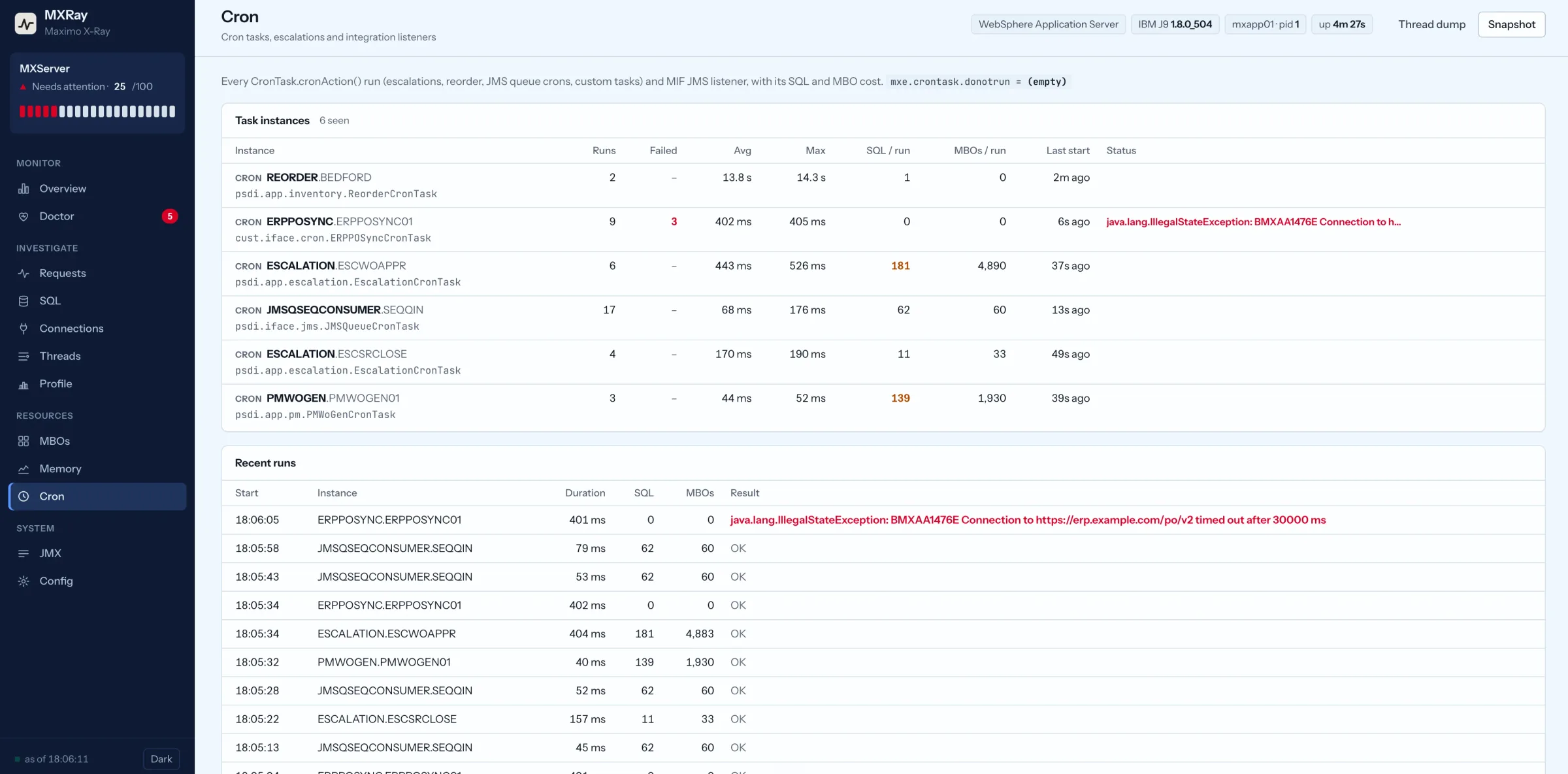
If the slowness has a schedule, look at the schedule. Escalations, PM generation, reorder, JMS consumers and every custom cron run on cronAction() in whichever JVM picks them up, and on a small install that is the JVM the planners are using. An escalation that qualifies four thousand records on the hour takes the heap and the pool with it.
Cron Task Setup shows the history per instance; overlapping runs mean the interval is shorter than the run time. The layout IBM has recommended for years is the fix: dedicated JVMs for UI, cron, integration and reports, with mxe.crontask.donotrun=ALL on the UI JVMs. Any system that lets interactive and background work share one runtime has this problem eventually, which is why Maintra runs background jobs in their own workers, sized apart from the API people click on.
Everyone blocked on one logger
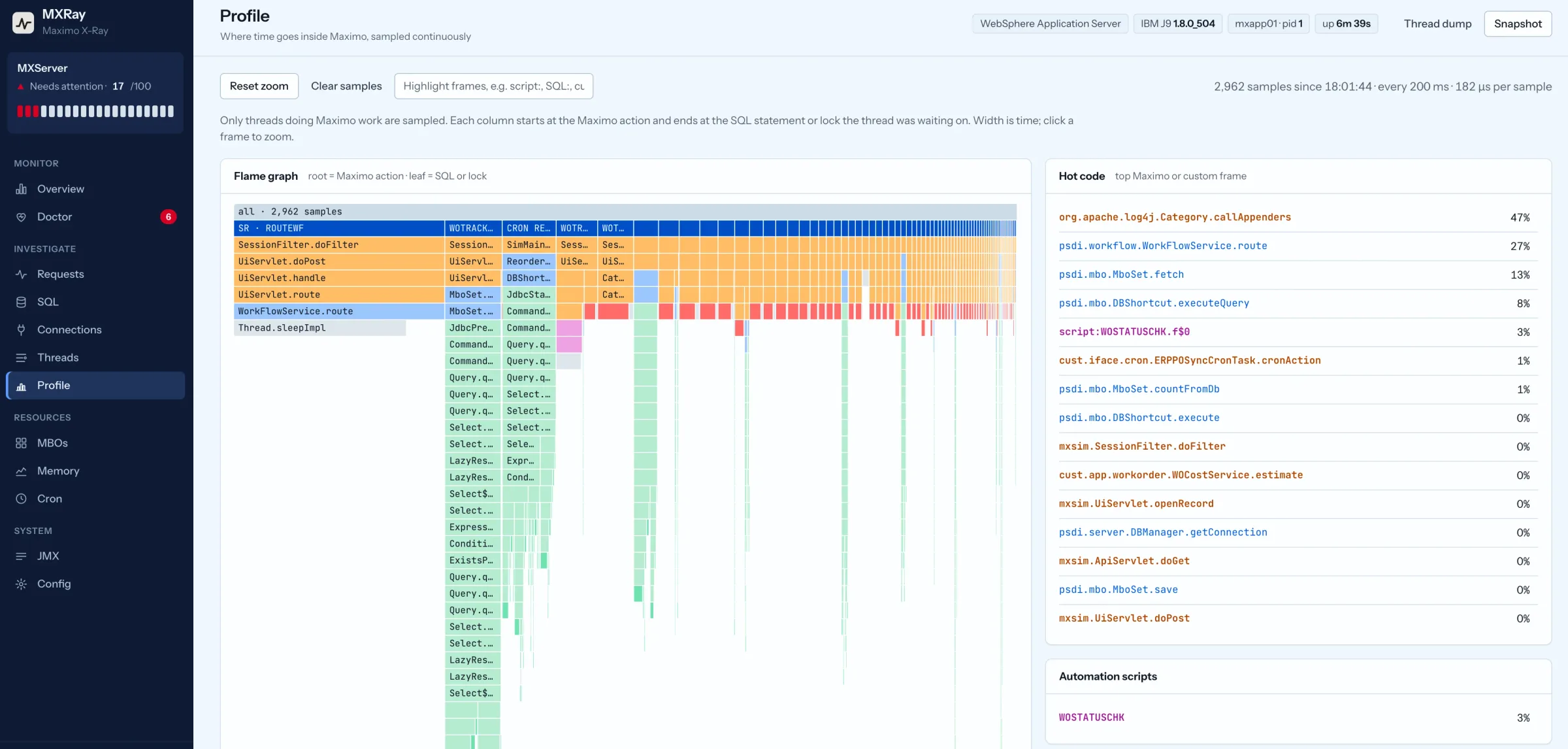
This one looks like a database problem. Someone raised the sql, mbo, crontask or integration root logger to DEBUG and never put it back. Log4j serialises writes through the appender, so every thread that logs now queues behind one lock. The thread dump shows dozens of threads BLOCKED on the same owner, and the owner is inside the logging framework.
The fix takes two minutes and no restart: Logging application, root loggers back to ERROR or WARN, Apply Settings. If the owner is in your own code instead, it is a synchronized block in a custom class, usually a cache or a counter.
Hung threads and the database behind them
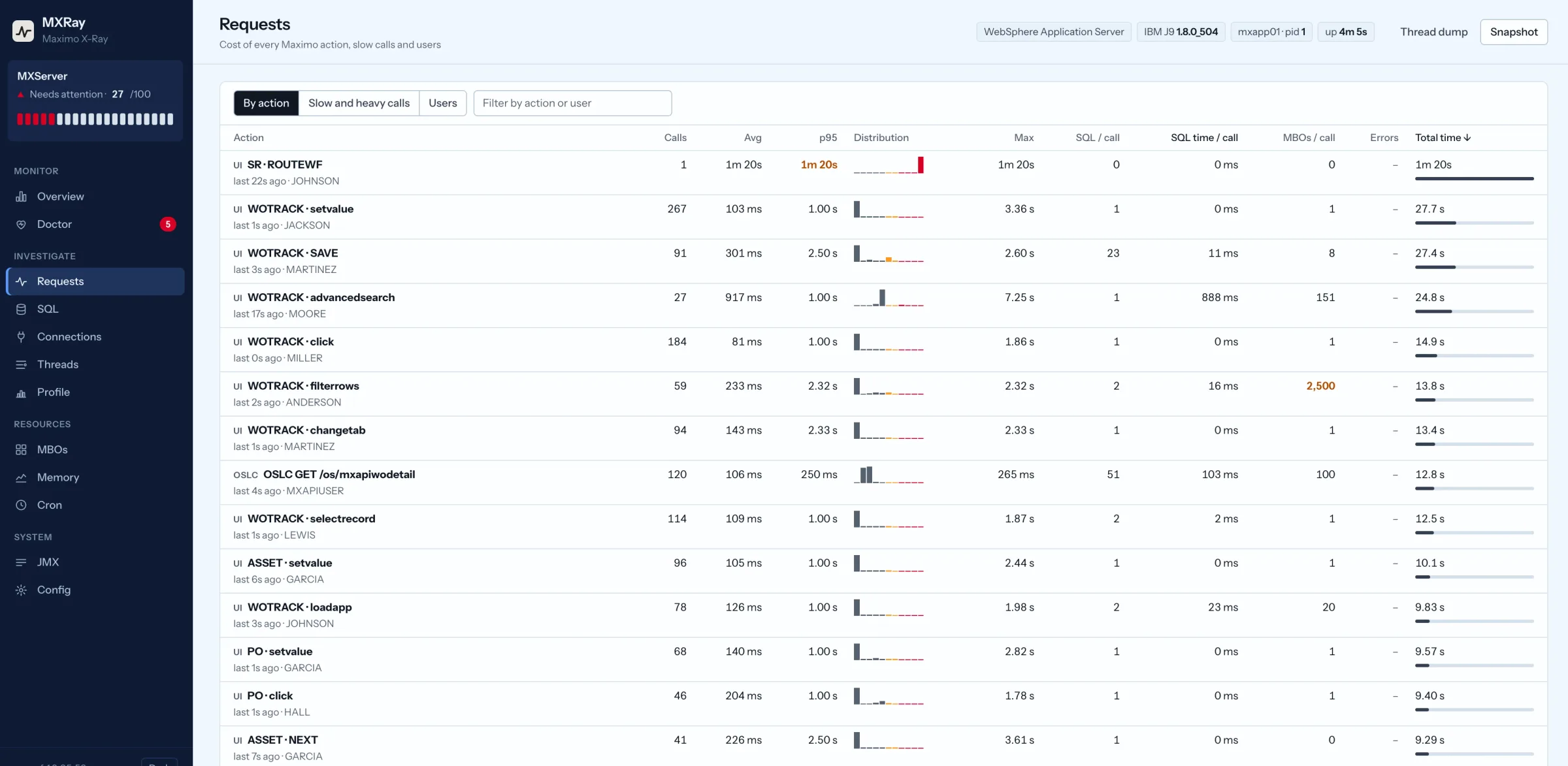
WebSphere reports a hung thread with WSVR0605W after ten minutes by default. The users have been waiting ten minutes too. On IBM J9, kill -3 <pid> writes a javacore without stopping anything; take three, thirty seconds apart. Read the LOCKS section first for a named deadlock, then the BLOCKED threads and their owner, then the threads inside socketRead0 under a JDBC frame. If most WebContainer threads are in that last group, the JVM is waiting on the database, and the database will name the blocking session:
-- Oracle
select sid, blocking_session, event, seconds_in_wait from v$session where blocking_session is not null;
-- Db2
select * from table(mon_get_appl_lockwait(null, -2));
-- SQL Server
select session_id, blocking_session_id, wait_type, wait_time from sys.dm_exec_requests where blocking_session_id <> 0;
The blocking session is very often a Maximo transaction that is itself stuck in the JVM, which is why the thread dump and the session list have to be read together. IBM documents the hang detection policy; lowering the threshold gets the warning earlier, but a dump gets the cause.
The first thirty minutes
Before anyone restarts anything
- Keep the evidence Three javacores thirty seconds apart, the current verbose GC log, and the database session count per application server host.
- Decide JVM or database Count threads in socketRead0 under JDBC against threads in Maximo or custom frames. Mostly database: blocking sessions. Mostly JVM: continue.
- Check memory and the pool Heap after the last full collection, pause times, connections held against pool size. A climbing floor or a climbing pool tells you which section above applies.
- Find the action and the user From the dump or the SQL log, identify the application, the event and the user behind the busy threads. One action for many users means code; one user means a query.
- Fix the cheapest thing first Loggers to WARN, fetch stop limit on, a default query, a cron moved off the UI JVM. Write down what changed so next week’s evidence means something.
Let an agent read it
Every capture in this article comes from MXRay, a Java agent I built to do the joining above from inside the Maximo JVM. It attaches through one JVM option or live to a running server, changes nothing in Maximo, and attributes SQL, MBOs, connections and thread time to the action, the user and the custom class or automation script responsible. When something goes critical it writes an incident snapshot to disk, so the evidence survives the restart.
The part that changes how the triage gets done is that every endpoint the dashboard uses is an API. The Doctor tab is /api/doctor, the connections tab is /api/db, the thread X-ray is /api/threads, and there is a compact /api/brief and an /llms.txt that explains the method. An AI assistant can query those directly, cross-reference the leaked connection with the slow action and the failing cron, and write the report with the fix steps, without screen-scraping and without a person copying numbers between tools. The same JSON feeds Prometheus for Grafana and a downloadable snapshot for a support ticket.
It is in early access for Maximo on WebSphere; the details and the request form are here.
Maximo is rarely slow everywhere at once. Something specific is slow, and everyone else is queued behind it.
Frequently asked questions
Frequently asked questions
Why is Maximo slow for everyone at the same time?
Should I just give the JVM more heap?
How do I find which user or which screen is slow?
mxe.db.logSQLTimeLimit so slow statements reach the Maximo log with the user and application, or read the Maximo application and event in the busy threads of a dump. Sorting database top SQL by executions rather than time finds the N+1 loops that per-statement views miss.